NEXA CRM
(1). Overview
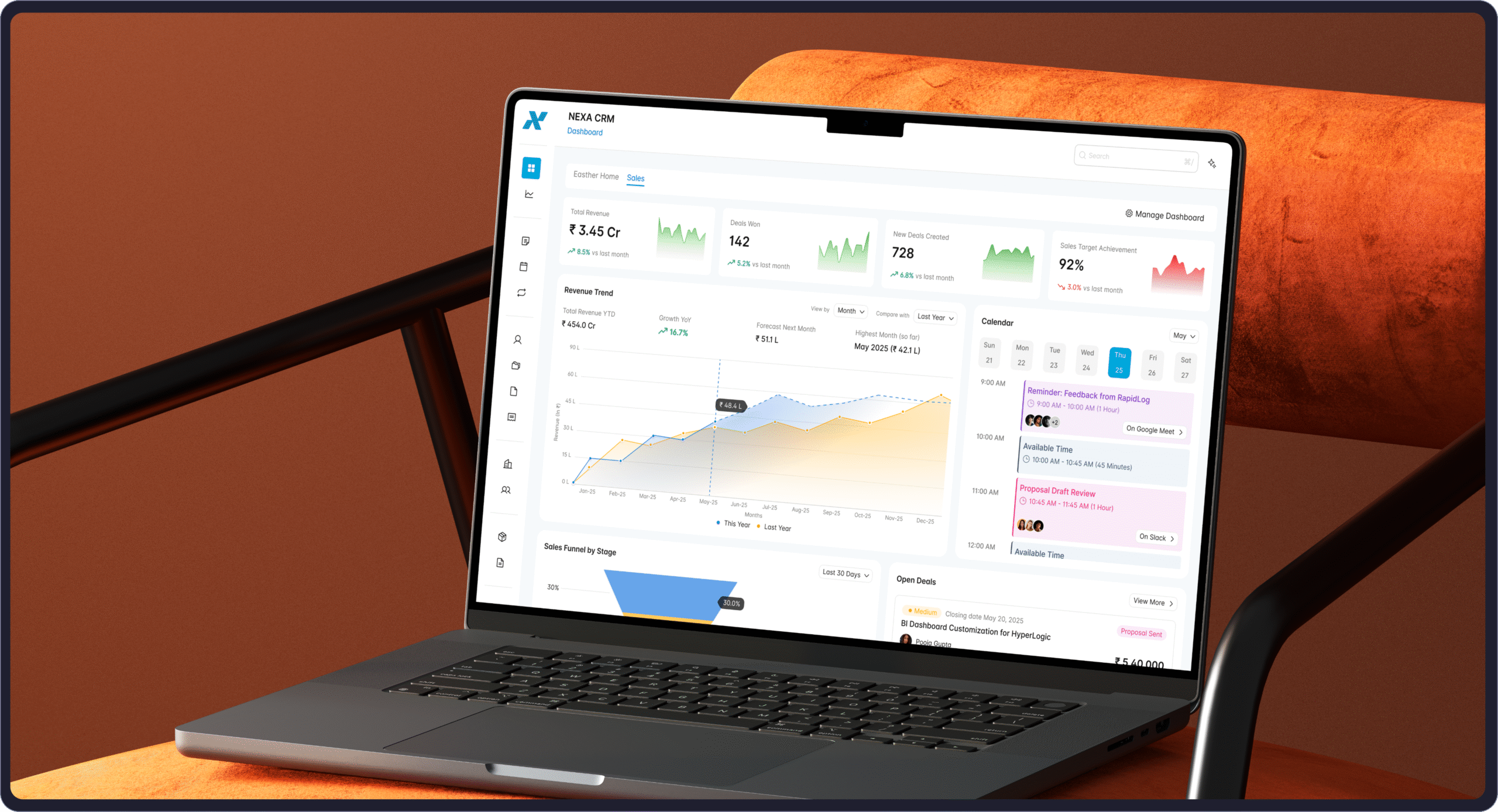
Our CRM platform solves the biggest challenge growing businesses face: managing customers, sales, and operations across disconnected tools. Instead of juggling spreadsheets and multiple software solutions, everything lives in one intuitive system with smart dashboards, automated lead scoring, and seamless quote-to-invoice workflows.
What sets us apart is how everything connects – leads automatically flow through your pipeline, customer data syncs across teams, and sales processes integrate with project management. The platform scales from startups to 500+ employee companies, designed for teams who want to focus on relationships and deals, not wrestling with complicated software.
With real-time analytics, intelligent automation, and user-friendly design, businesses see immediate improvements in lead conversion, faster deal closure, and better team collaboration. It’s powerful enough for complex processes yet simple enough for immediate adoption.
Year
2024-2025
Duration
40+ Weeks
Category
Enterprise Software
Role
Product Designer
(2). Challenge
The Problem We Identified
Fragmented Customer Data – Businesses were struggling with customer information scattered across multiple platforms, spreadsheets, and tools, making it impossible to get a complete customer view.
Manual Lead Management – Sales teams were wasting hours on repetitive tasks like data entry, lead qualification, and follow-up scheduling instead of focusing on actual selling.
Poor Sales Visibility – Management had no real-time insights into pipeline health, team performance, or revenue forecasting, leading to missed opportunities and poor decision-making.
- Inefficient Communication – Teams lacked centralized communication tools, resulting in duplicate efforts, missed follow-ups, and inconsistent customer experiences.
- Complex Quoting & Invoicing – Creating quotes and managing invoices was time-consuming and error-prone, often involving multiple disconnected systems.
- Limited Task & Project Tracking – No unified way to manage customer-related tasks, projects, and deadlines, causing things to fall through the cracks.
- Lack of Integration – Existing tools didn’t communicate with each other, creating data silos and requiring constant manual synchronization.
What We're Solving
- Unified Customer Hub – Single source of truth for all customer data, interactions, and history accessible to entire team.
- Automated Lead Pipeline – Intelligent lead scoring, automated nurturing sequences, and streamlined qualification processes that convert more prospects.
- Real-Time Analytics Dashboard – Comprehensive visibility into sales metrics, pipeline health, and performance KPIs with actionable insights.
- Integrated Communication Center – Centralized messaging, email integration, and collaboration tools that ensure no customer touchpoint is missed.
- Streamlined Quote-to-Cash – Professional quote generation, automated approval workflows, and seamless invoicing that accelerates deal closure.
- Smart Task Management – AI-powered task prioritization, automated reminders, and project tracking that keeps teams organized and customers happy.
- All-in-One Platform – Complete CRM ecosystem that eliminates the need for multiple tools while providing seamless data flow and reporting.
(3). Who We're Designing For
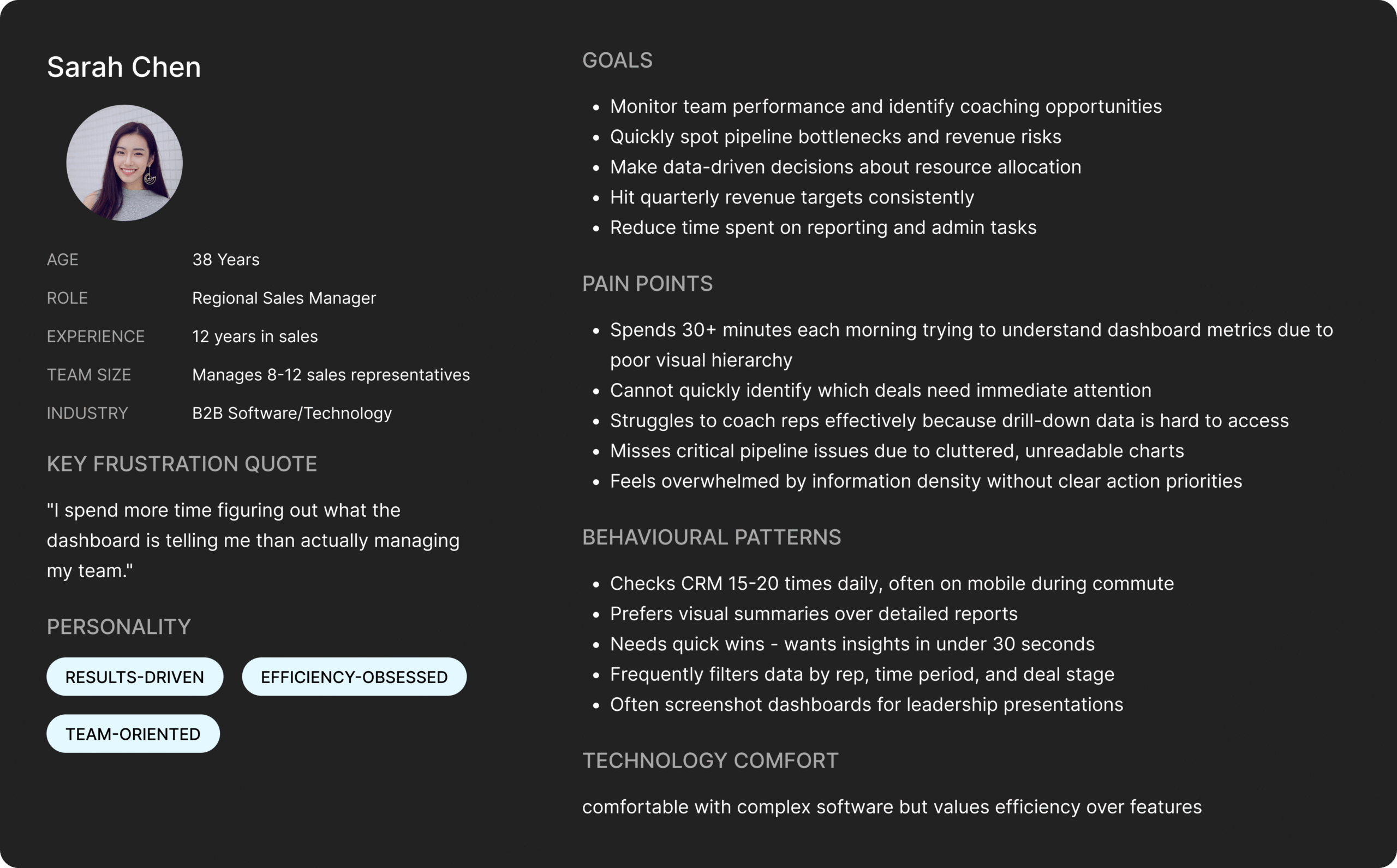
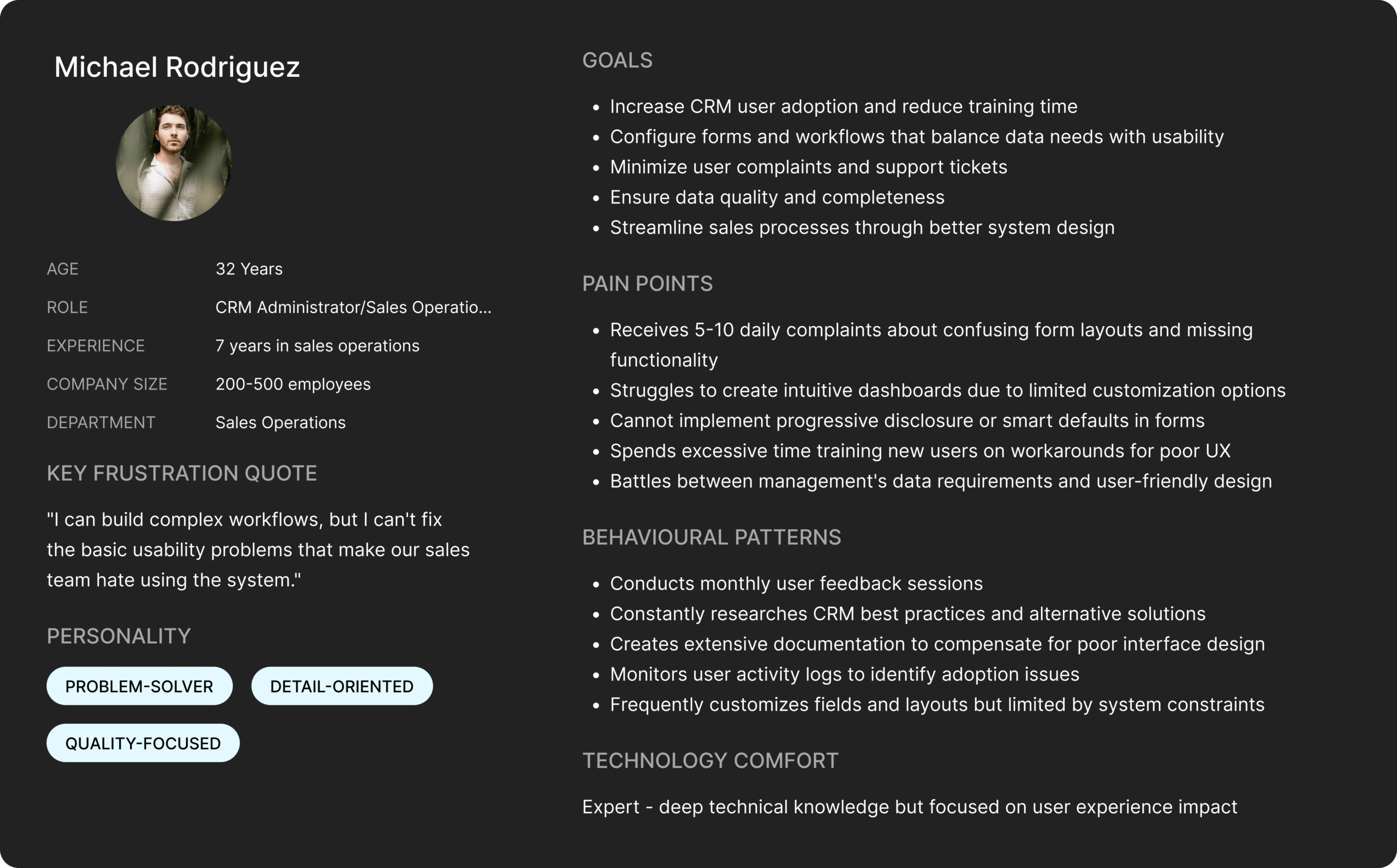
To create effective solutions, we first needed to understand who experiences these CRM challenges daily. Through user research and stakeholder interviews, we identified two primary user types with distinct needs, goals, and pain points. These personas guide our design decisions and ensure we’re solving real problems for real people, not just fixing interface issues in isolation.
Our personas represent the most common user archetypes struggling with the current CRM system – each facing unique challenges that require tailored solutions. By understanding their motivations, frustrations, and daily workflows, we can prioritize design improvements that will have the greatest impact on user satisfaction and productivity.
(4). UX Audit
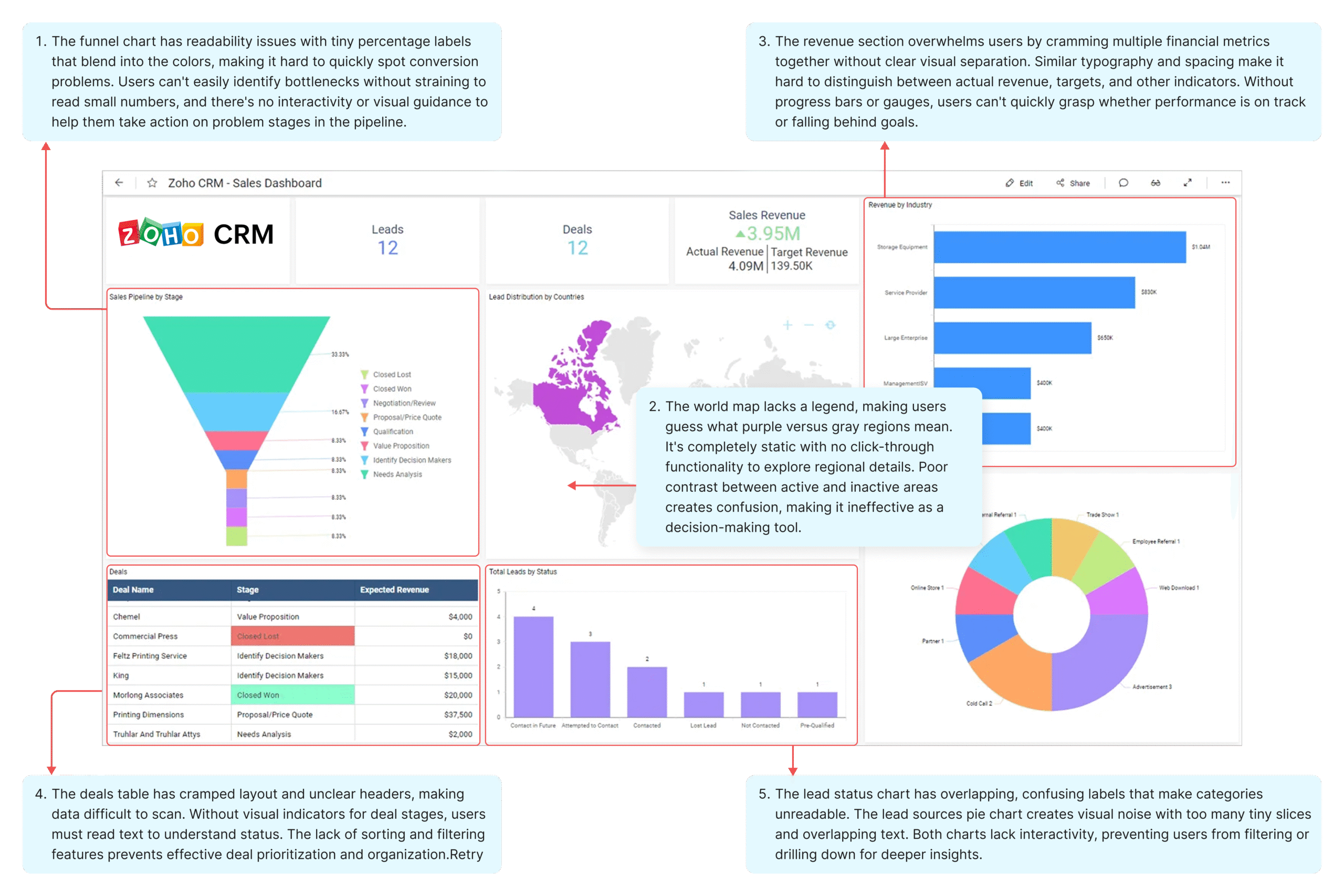
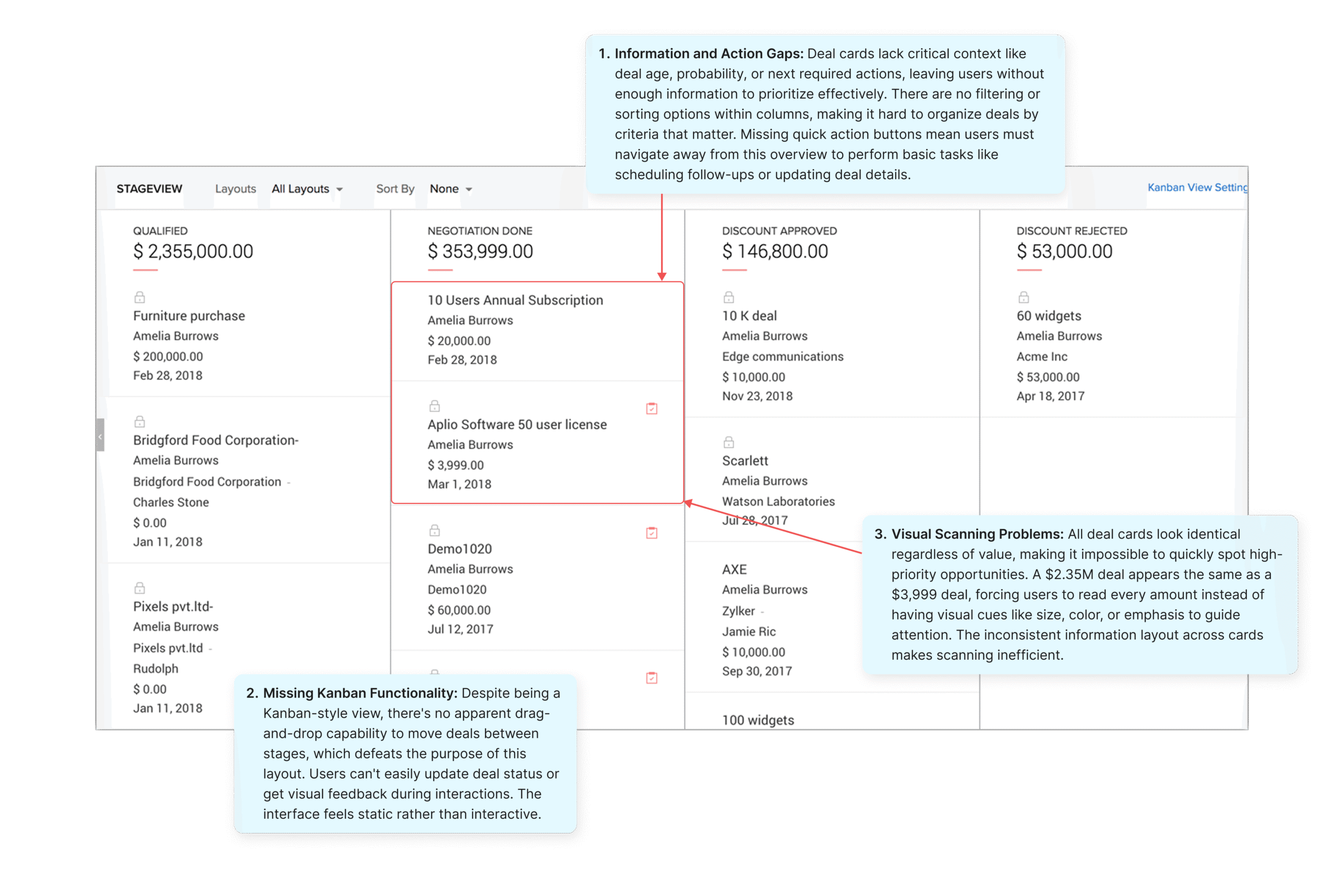
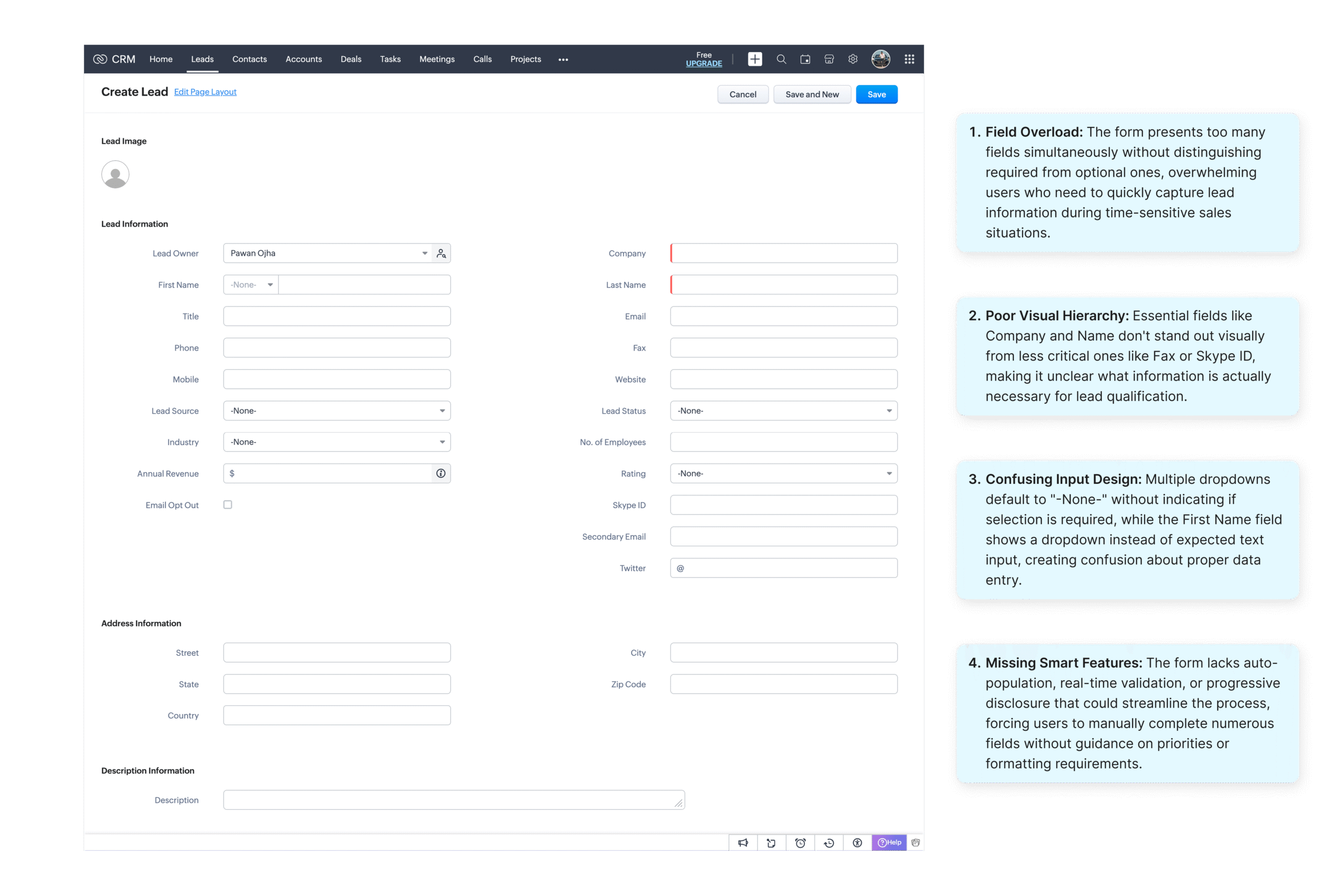
We conducted a comprehensive UX audit of the existing CRM system to identify specific usability issues affecting daily workflows. Through heuristic evaluation and user feedback analysis, we documented critical pain points across key interfaces including the sales dashboard, pipeline management, and lead creation processes.
This analysis revealed patterns of poor information hierarchy, overwhelming data density, and missing interactive functionality that directly impact user productivity and decision-making. Each screen presents unique challenges that compound to create an overall frustrating user experience, driving low adoption rates and inefficient sales processes.
(5).Competitive Analysis
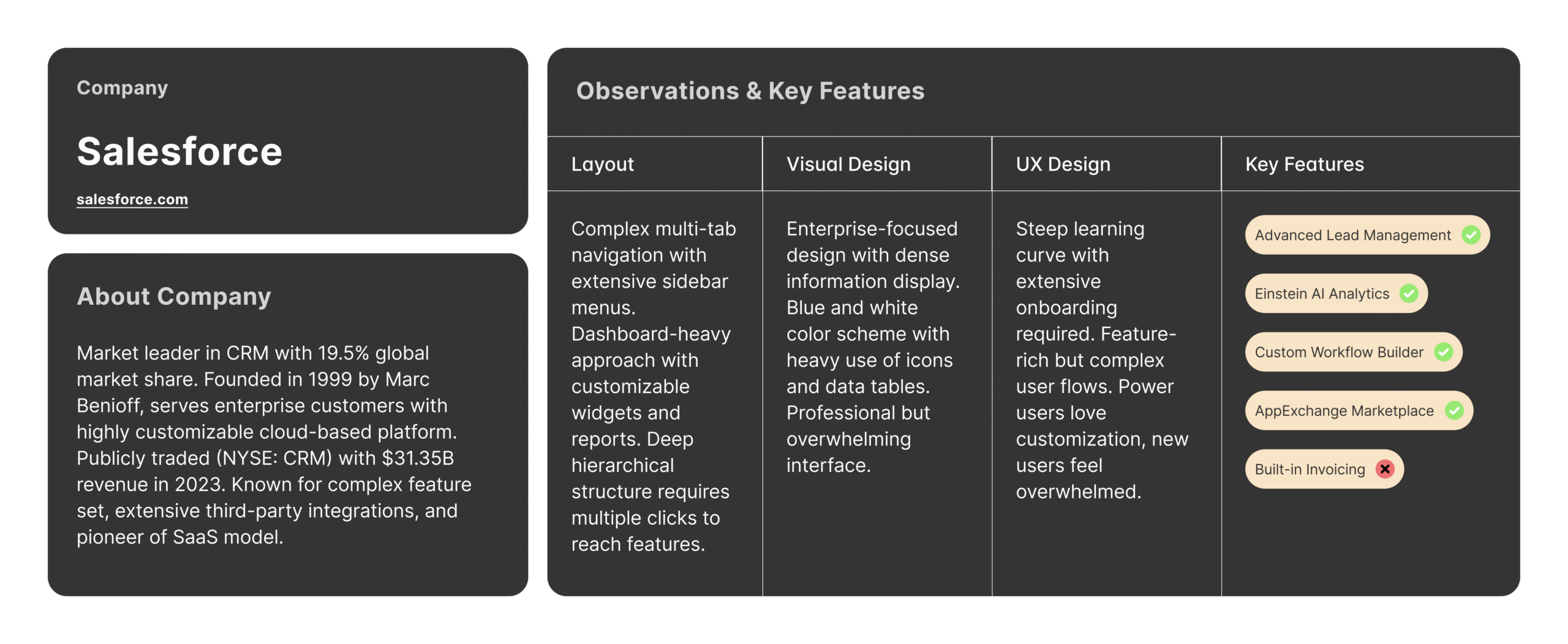
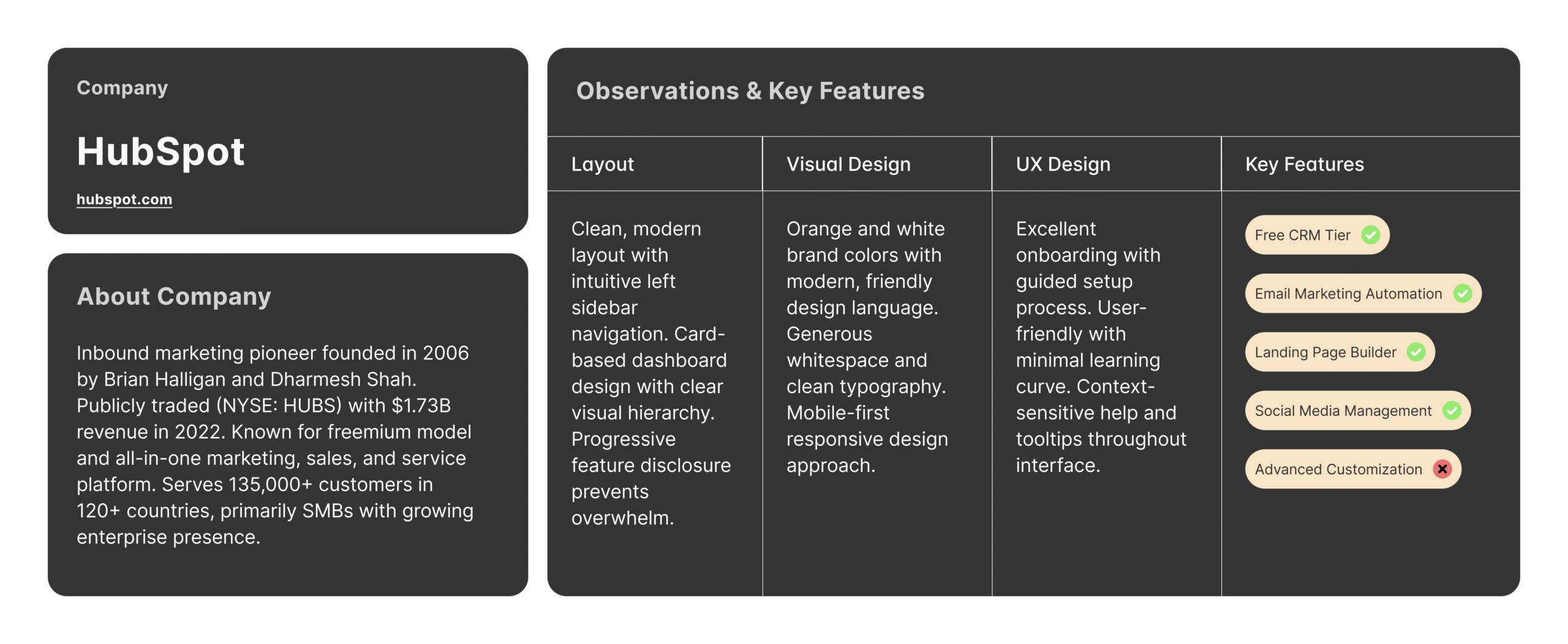
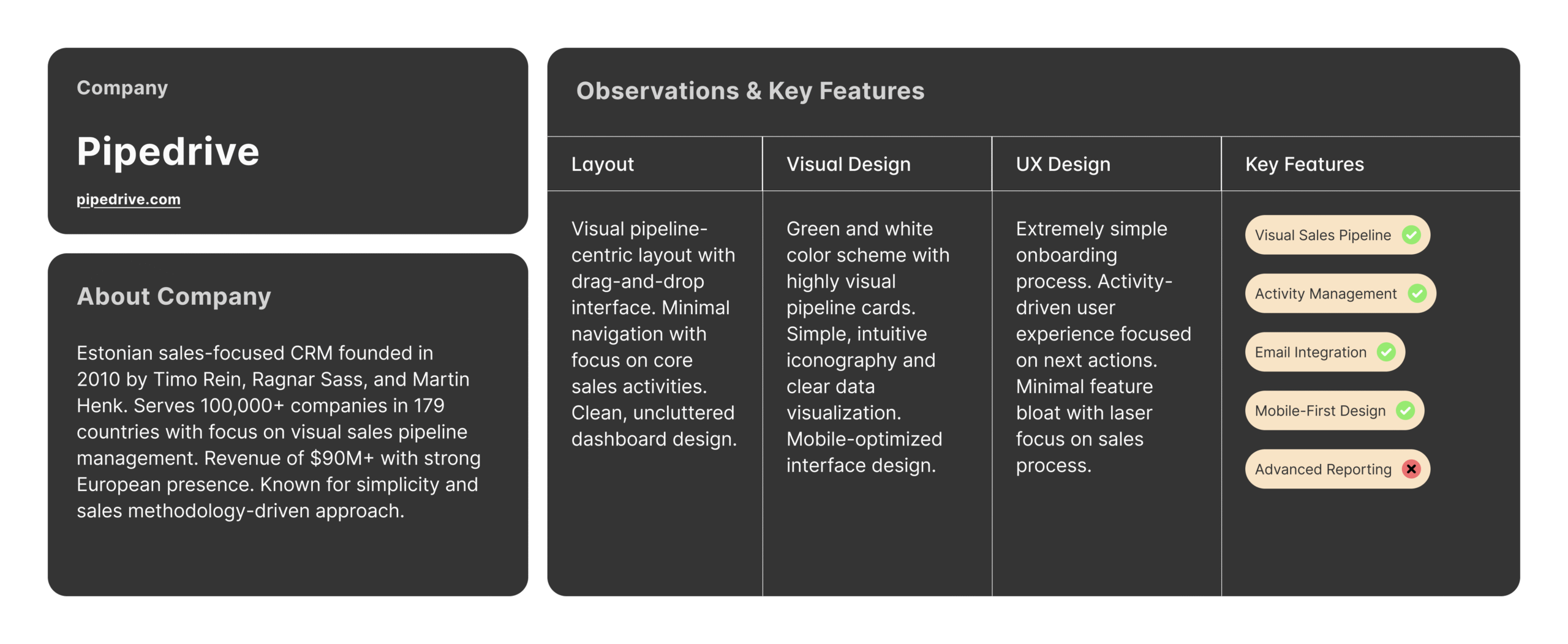
To understand industry standards and identify opportunities for improvement, we analyzed leading CRM platforms including Salesforce, HubSpot, and Pipedrive. This research focused on how competitors handle common UX challenges like dashboard design, pipeline visualization, and data entry workflows.
The analysis revealed best practices in information hierarchy, interactive design patterns, and user-friendly features that our current system lacks. By studying successful implementations, we identified specific design solutions and interaction patterns that could significantly improve our users’ experience while maintaining competitive advantage.
(6).SWOT Analysis
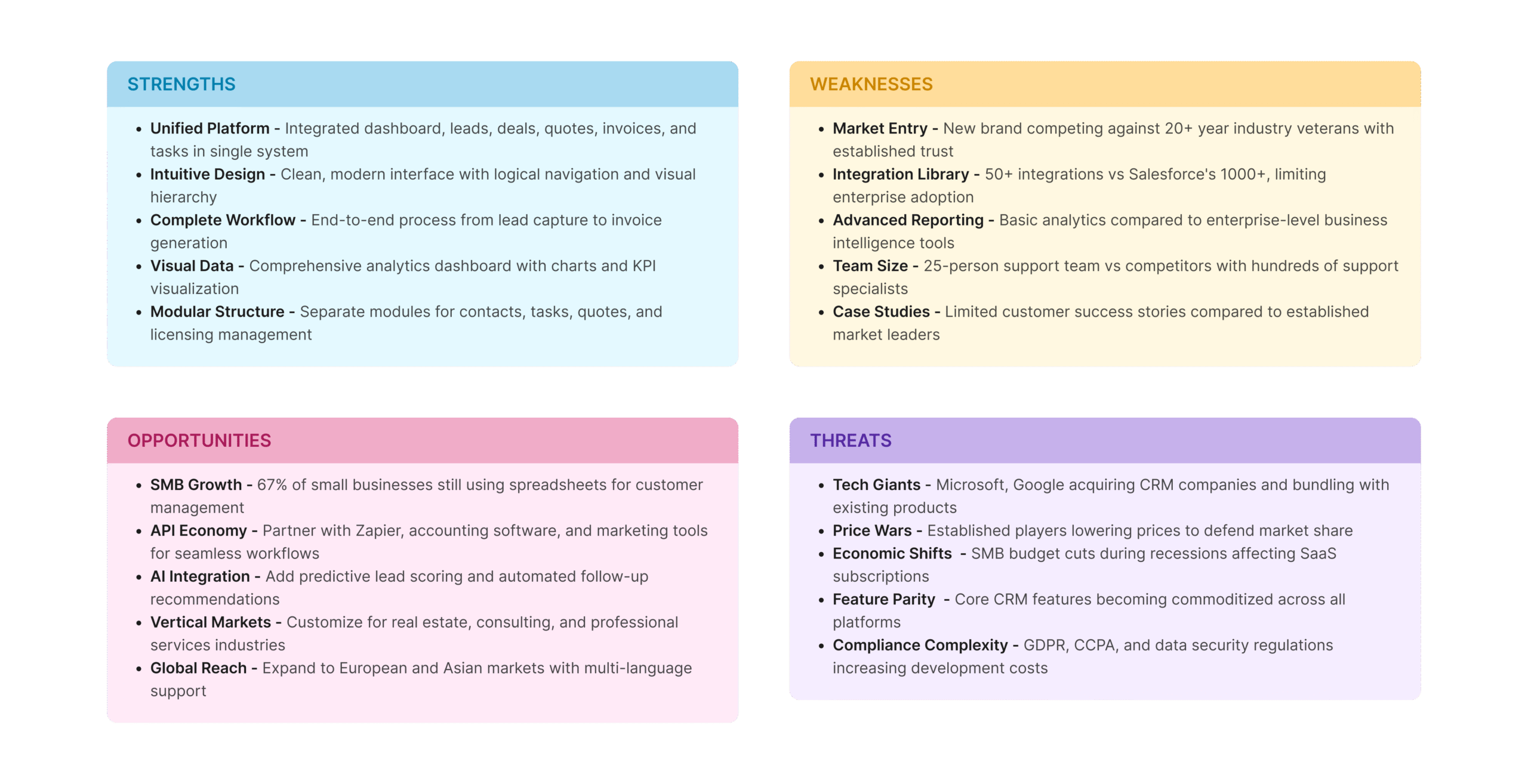
We conducted a SWOT analysis to evaluate our CRM’s strategic position and identify key areas for UX improvement. This assessment examined internal strengths and weaknesses alongside external opportunities and threats in the competitive landscape.
The analysis highlighted our system’s robust functionality as a core strength while revealing significant UX weaknesses that impact user adoption. Market opportunities for improved user experience became clear when compared against competitive threats from more user-friendly platforms. This strategic view helped prioritize design improvements that leverage our strengths while addressing critical usability gaps.
(7).Design methodology
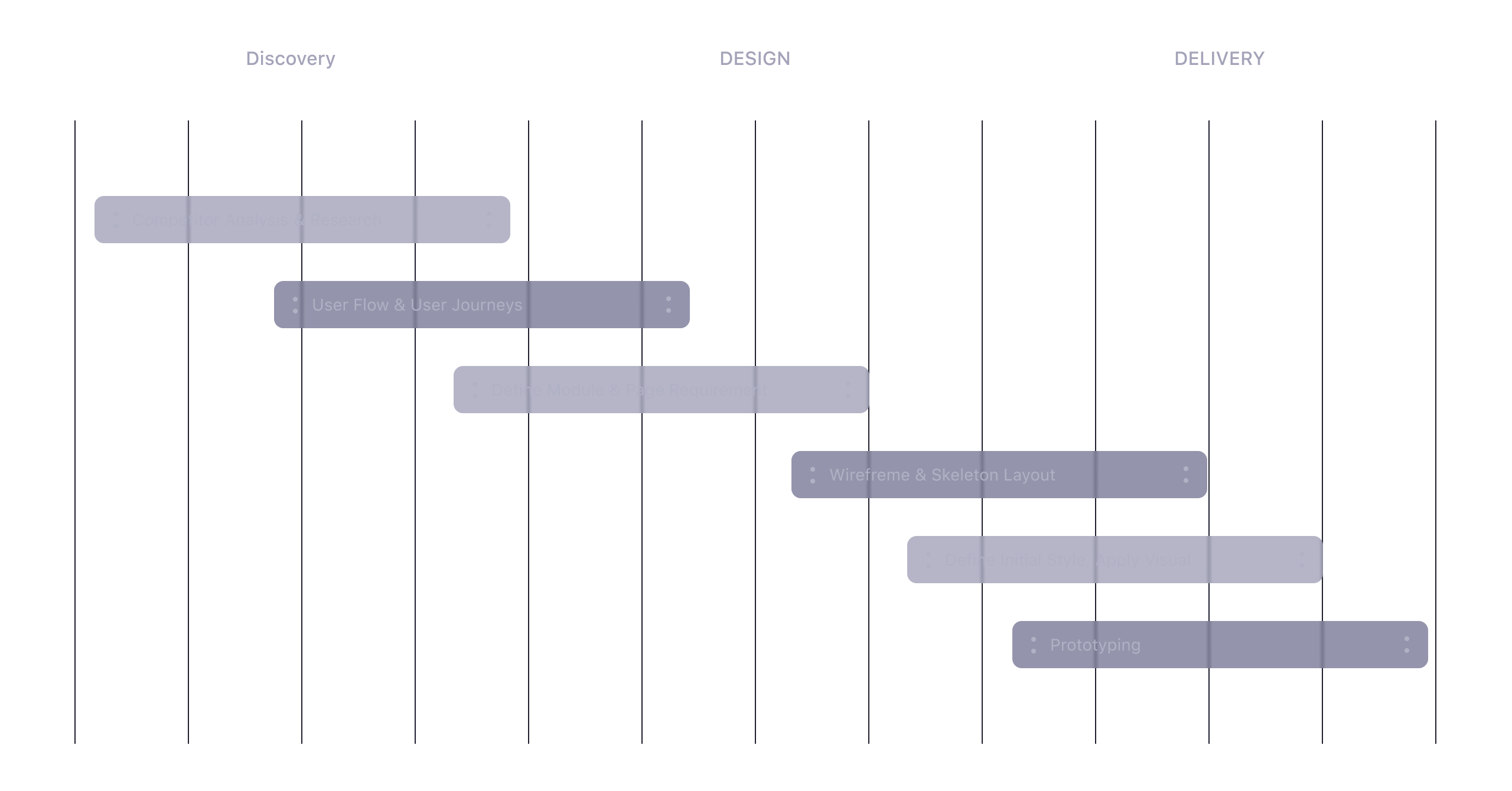
Our design journey begins with concept discovery, where we dive deep into understanding the key needs and goals. This forms the foundation for crafting solutions, which then evolve into a testable prototype.
(8). Innovative Features
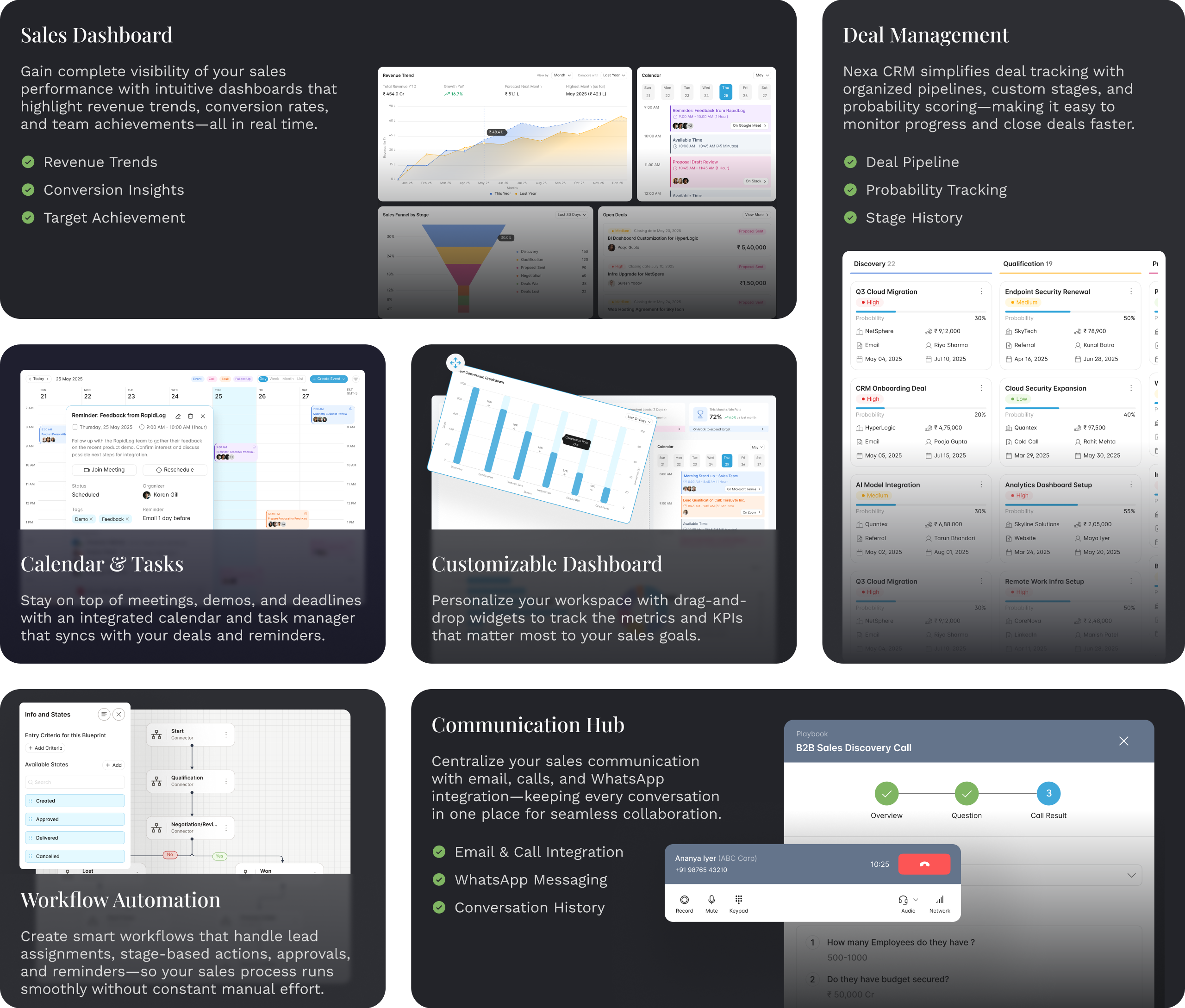
TalentForge simplifies HR management with features like streamlined job and employee management, customizable forms, centralized communication, and calendar tools. It also enables efficient payroll, time tracking, and organizational structure visualization, offering a seamless, all-in-one solution for modern HR needs.
(9). Dashboard
Stay on top of your HR operations with the TalentForge Dashboard. This comprehensive view provides real-time insights into key metrics such as total employees, new joiners, employee engagement, tasks, and events. Track the hiring pipeline across stages, monitor interviewer activities, and view top applicant sources at a glance. The dashboard also keeps your daily tasks organized, ensuring you never miss a beat in managing talent effectively.

(10). Calendar, Tasks & Follow-Ups — One place to plan, act and close
Bring scheduling, execution, and reminders together with a unified Calendar, Tasks & Follow-Ups workspace. The calendar is your command center: hover any event to see a compact data card with title, duration, description, organizer, participants, attachments and quick actions like “Join Meeting” or “Reschedule.” Use the primary action menu to quickly create an Event, Task, Follow-Up, or Call Log – so nothing is lost in tool switching.
Tasks are presented in a clean list with all important context: task title, status, associated contact and company, task type, priority, owner, notes, last contact, due date and last engagement. The task create form is quick and structured, helping users capture the who, what, and when – without friction.
Follow-Ups are managed similarly: create and view prioritized follow-up items with fields for title, type, priority, linked record, due date, owner and notes. Each follow-up shows clearly in the calendar and task lists so actions stay connected to outcomes.
Combined, this module removes noise and creates a single workflow: schedule, assign, follow up and close. With in-context reminders, file attachments, and participant links, teams stay aligned and respond faster – turning intentions into results.
(11). Lead Management 360° View
The Lead Management Hub offers a complete 360° view of every potential customer, empowering teams to capture, track, and nurture leads efficiently from the very first interaction. The system allows users to create detailed lead profiles with essential information such as full name, contact details, email, company name, website, annual revenue, lead source, priority level, and address — ensuring no critical data is missed.
Beyond basic details, the Lead Management view connects every touchpoint — activities, notes, emails, calls, tasks, meetings, quotes, deals, and documents — into one organized interface. Each lead’s timeline displays all updates and interactions, offering real-time visibility into progress and ownership. The platform also supports assigning lead owners, team members, and PICs (Persons In Charge), ensuring clear accountability and seamless collaboration across departments.
Integrated activity and communication tracking keeps your sales pipeline active and transparent. Users can log calls, send follow-up emails, create to-do tasks, schedule meetings, and attach important files directly within the lead’s record. Notes and updates stay linked to each lead, allowing sales teams to revisit context and maintain continuity.
The built-in Sales Playbook acts as a smart guide, suggesting next best actions, follow-up reminders, and nurturing strategies to help your team convert faster. Combined with analytics and conversion insights, this unified workspace enables you to manage leads strategically, streamline workflows, and turn every opportunity into a potential deal.
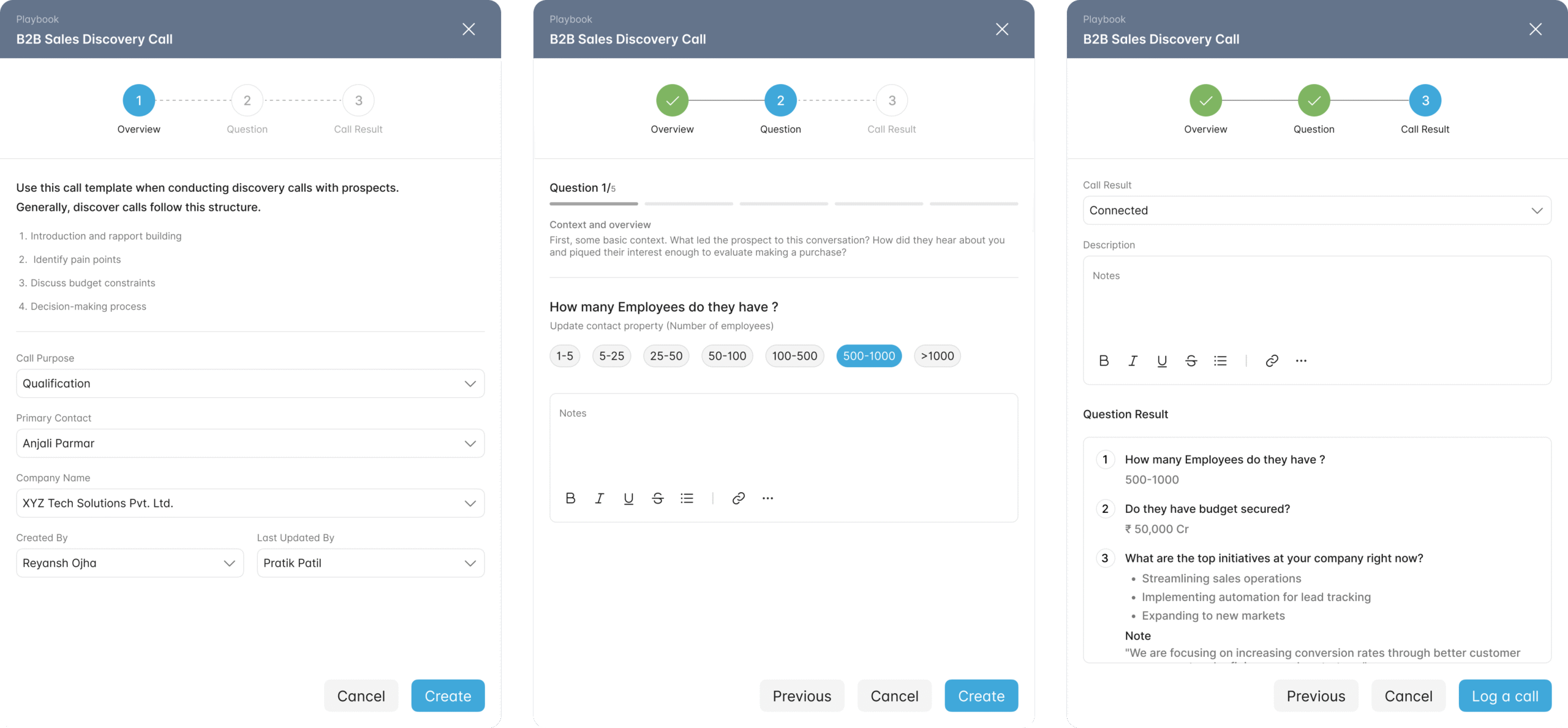
(12). Playbook — Your Step-by-Step Guide to Smarter Calls
Turn every call into a structured, repeatable process. With Playbooks, your team can follow predefined steps, ask the right questions, and capture key insights — all within one guided flow. Maintain consistency across every conversation while empowering reps to stay focused and deliver better results.
(13). Deals Management
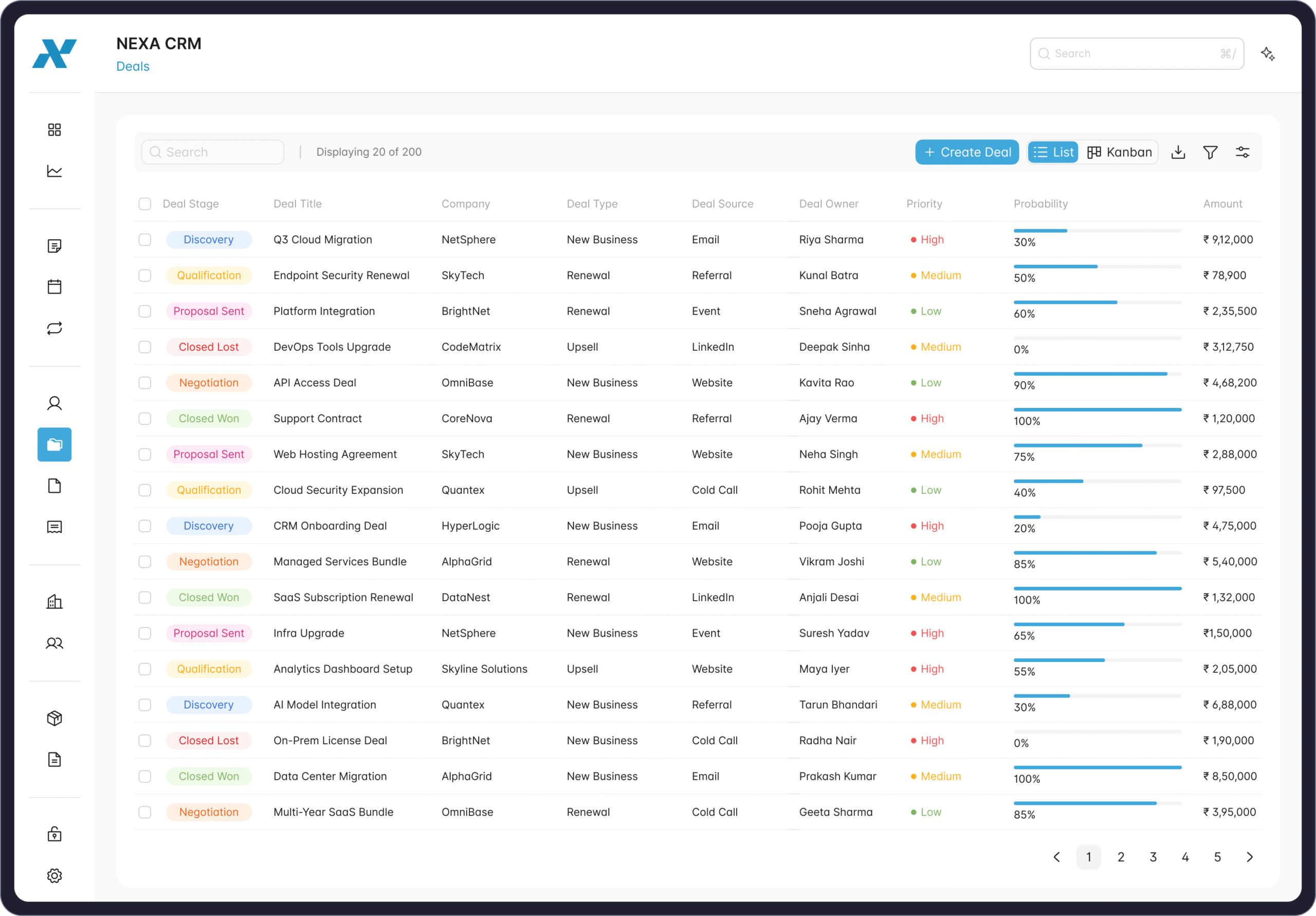
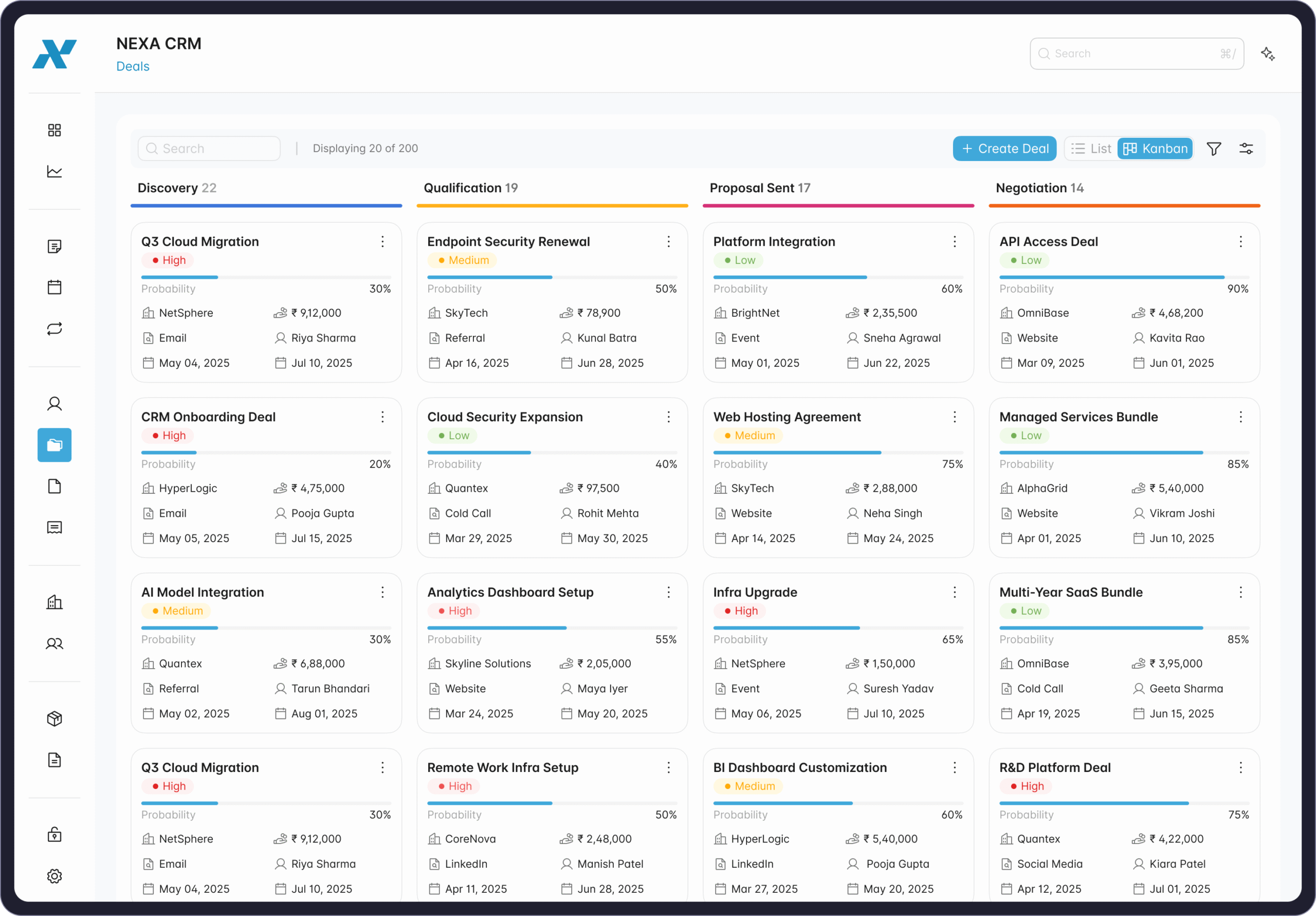
The Deals Management module serves as the central hub for tracking and managing all sales opportunities. It helps teams monitor deal stages, owners, probabilities, and revenue projections in one organized space. Users can switch between List View for detailed data analysis and Kanban View for a visual pipeline overview—making it easy to see progress, prioritize leads, and identify where deals stand in real-time.
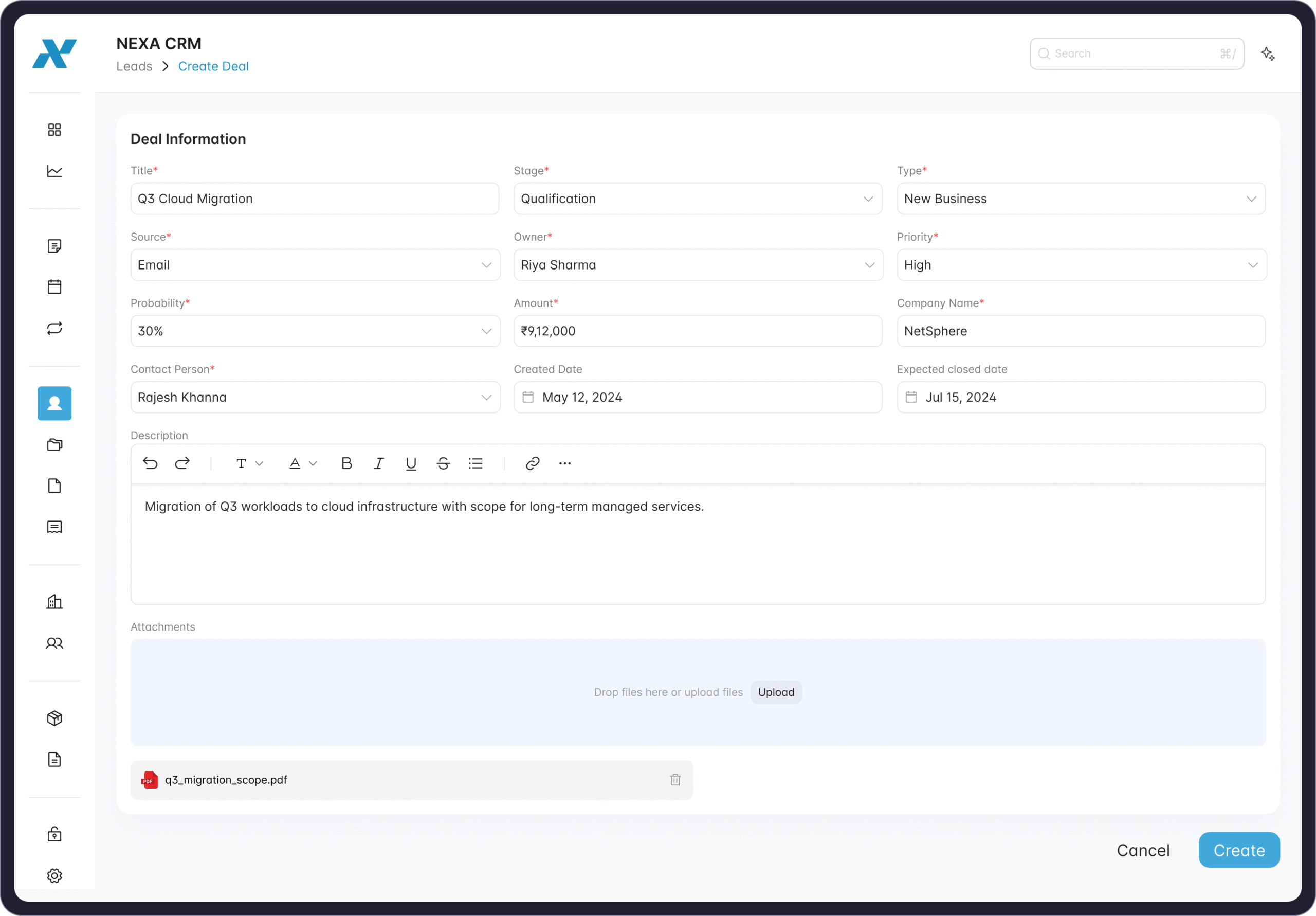
Creating or updating deals is simple and intuitive. The form includes all essential fields like deal title, company, owner, stage, amount, probability, and close date, ensuring every record is complete and actionable. By integrating with emails and workflow automation, it minimizes manual effort and enhances visibility across the sales cycle.
This feature empowers teams to stay focused, improve conversion rates, and make informed decisions—all while maintaining a seamless and consistent sales process.
(14). Quote Management System
The Quote Management module streamlines how businesses create, manage, and deliver professional quotations. From the first draft to client approval, every step is automated and centralized for maximum efficiency.
The intuitive Quote List View gives users a complete overview of all active, pending, and closed quotes, displaying essential details like deal names, stages, assigned owners, and total values. Teams can easily filter, search, and sort to stay organized and focused.
When creating a new quote, users can capture core business details including client information, contact data, billing and shipping addresses, tax information, and quote validity dates. The system supports multiple line items, enabling teams to add products or services with precise pricing, discounts, and tax breakdowns.
Integrated payment scheduling ensures clear milestone tracking, allowing businesses to plan and manage partial or phased payments effectively. With Notes and Attachments, users can include key documentation, internal instructions, or legal terms directly within the quote record.
Before sending, the Quote Preview provides a clean and professional layout showing every detail — client and business info, itemized costs, applicable taxes, terms, and the final amount. Quotes can be instantly exported or shared with clients, ensuring both transparency and consistency.
By combining automation, flexibility, and precision, the Quote Management System empowers sales teams to build trust, save time, and convert opportunities into revenue faster.
(15). Invoice Management — Simplified, Smart, and Automated
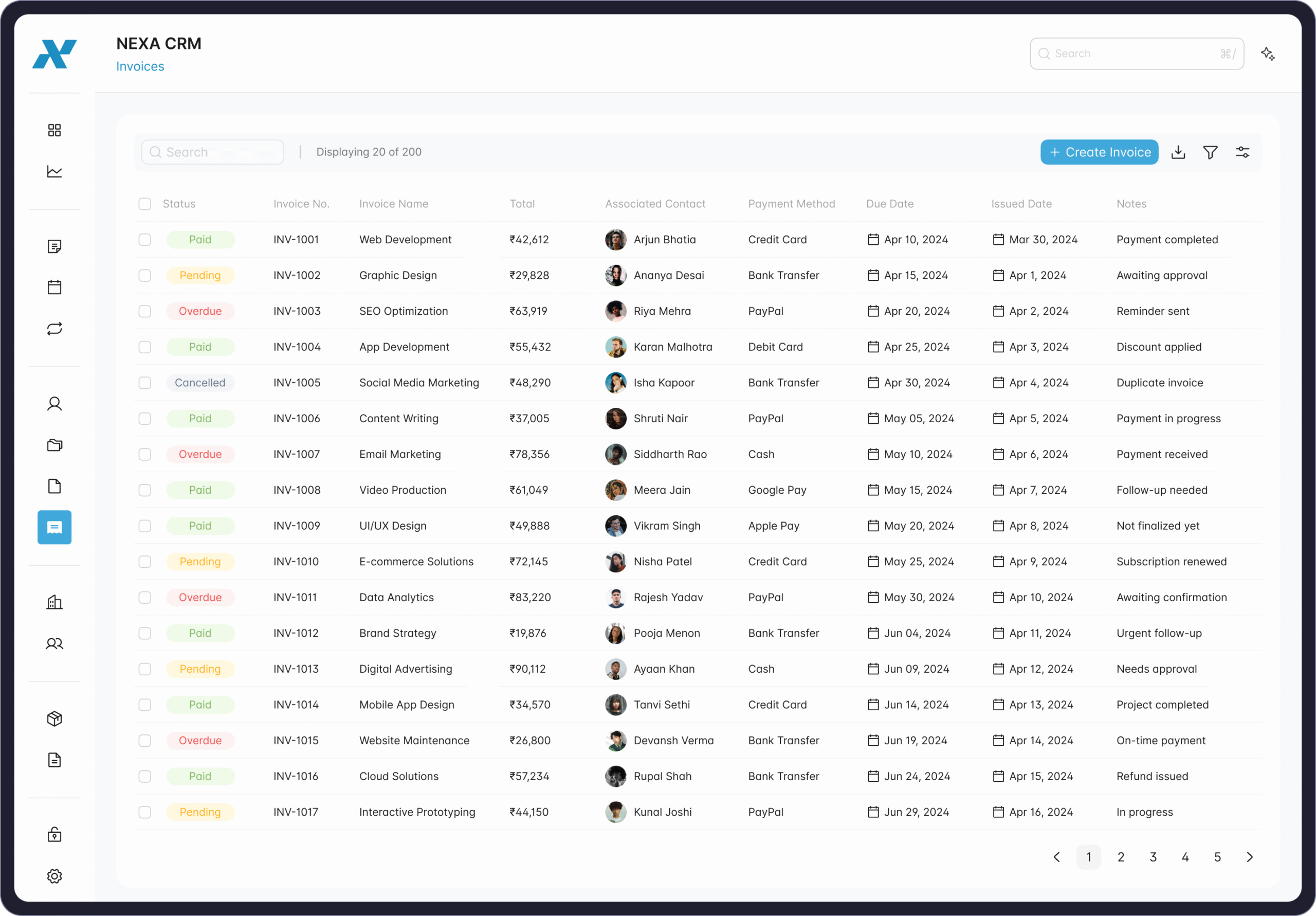
NEXA CRM brings all your billing operations under one dashboard. From generating invoices to tracking payments and due dates, everything stays organized and transparent.
Easily view invoice details, totals, payment methods, and customer associations — with clear status indicators for pending, paid, or overdue invoices.
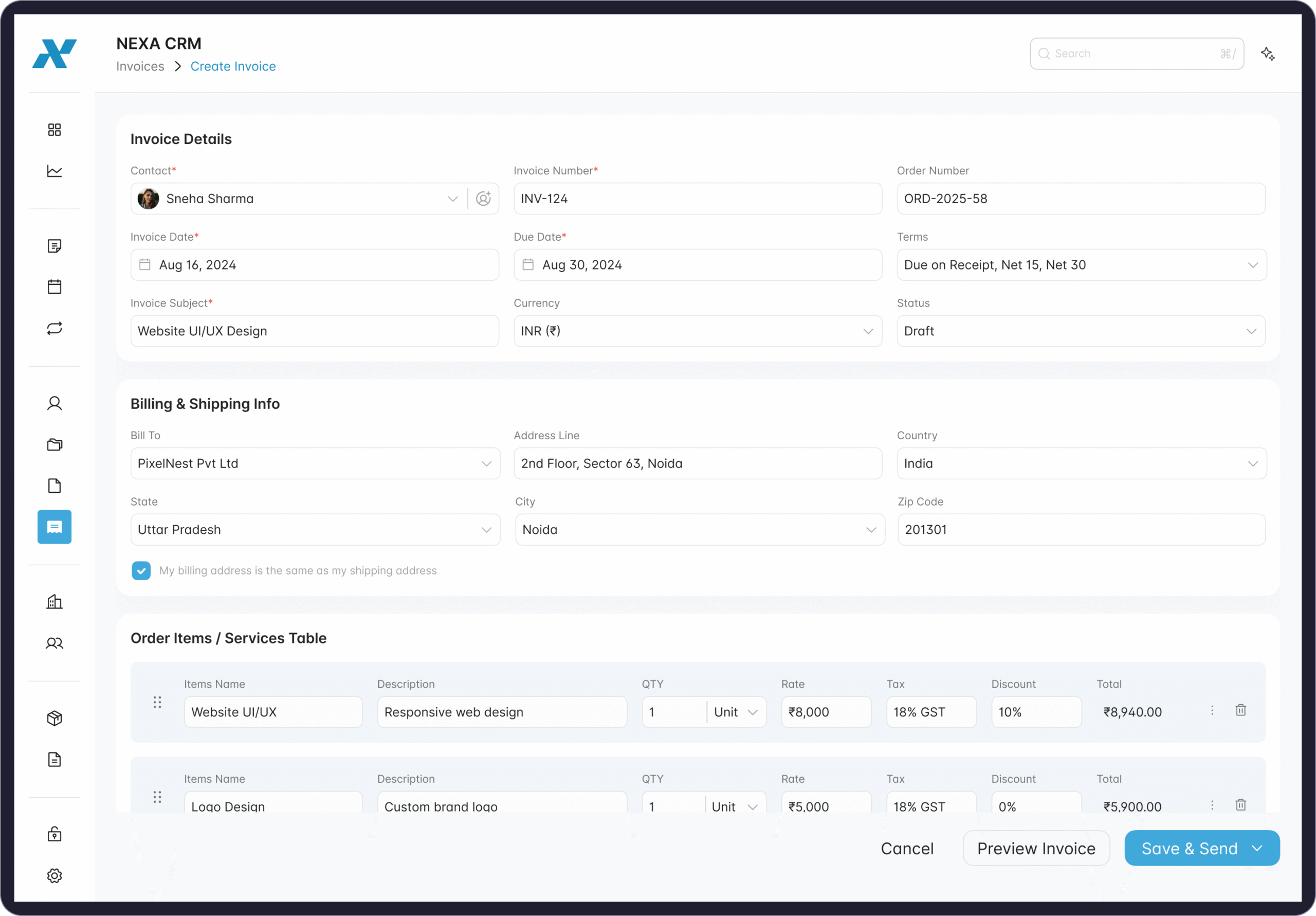
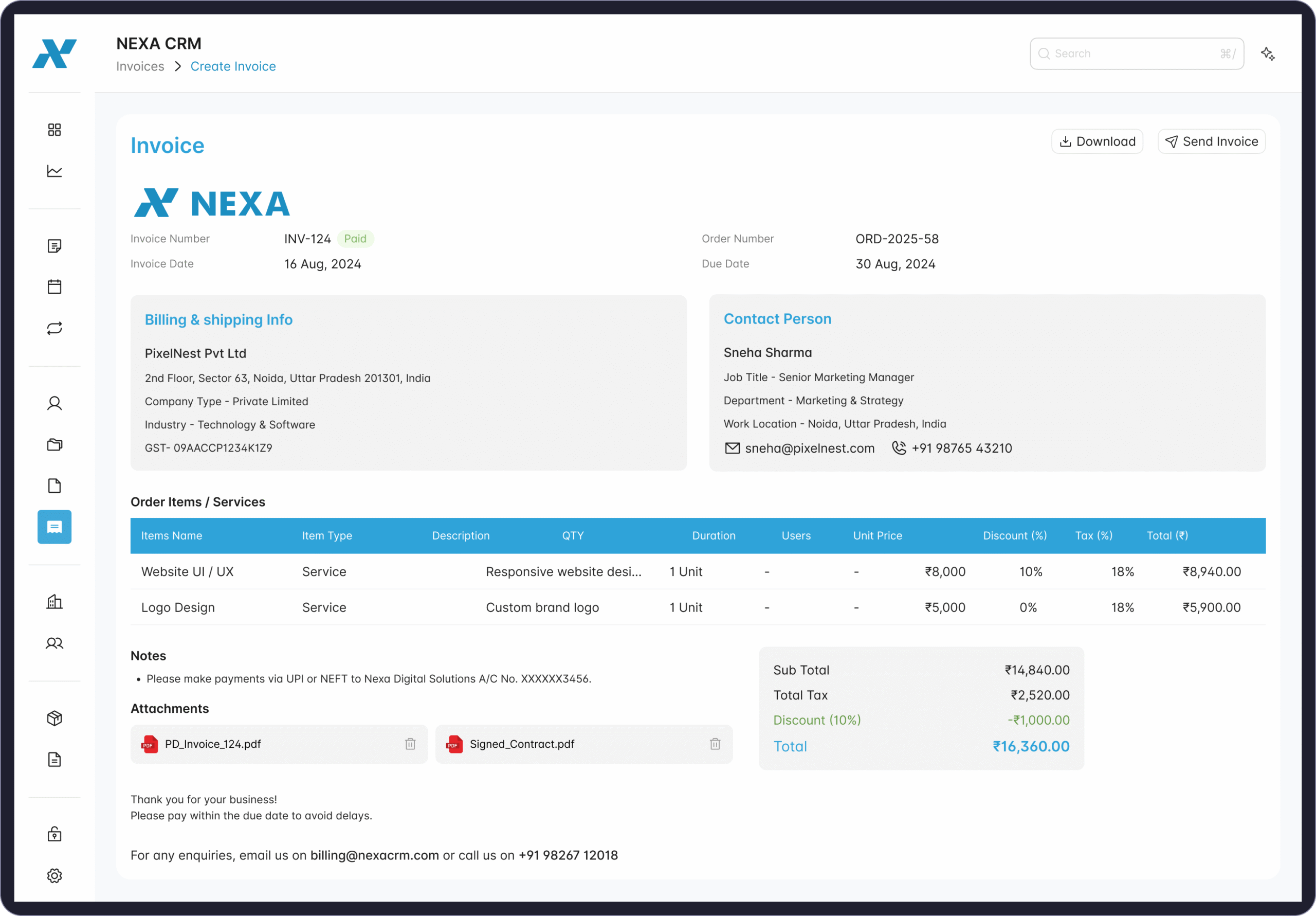
Create and manage invoices effortlessly with customizable templates, smart automation, and note tracking for every transaction.
Simplify your financial workflows, save time, and maintain accuracy — all within NEXA CRM.
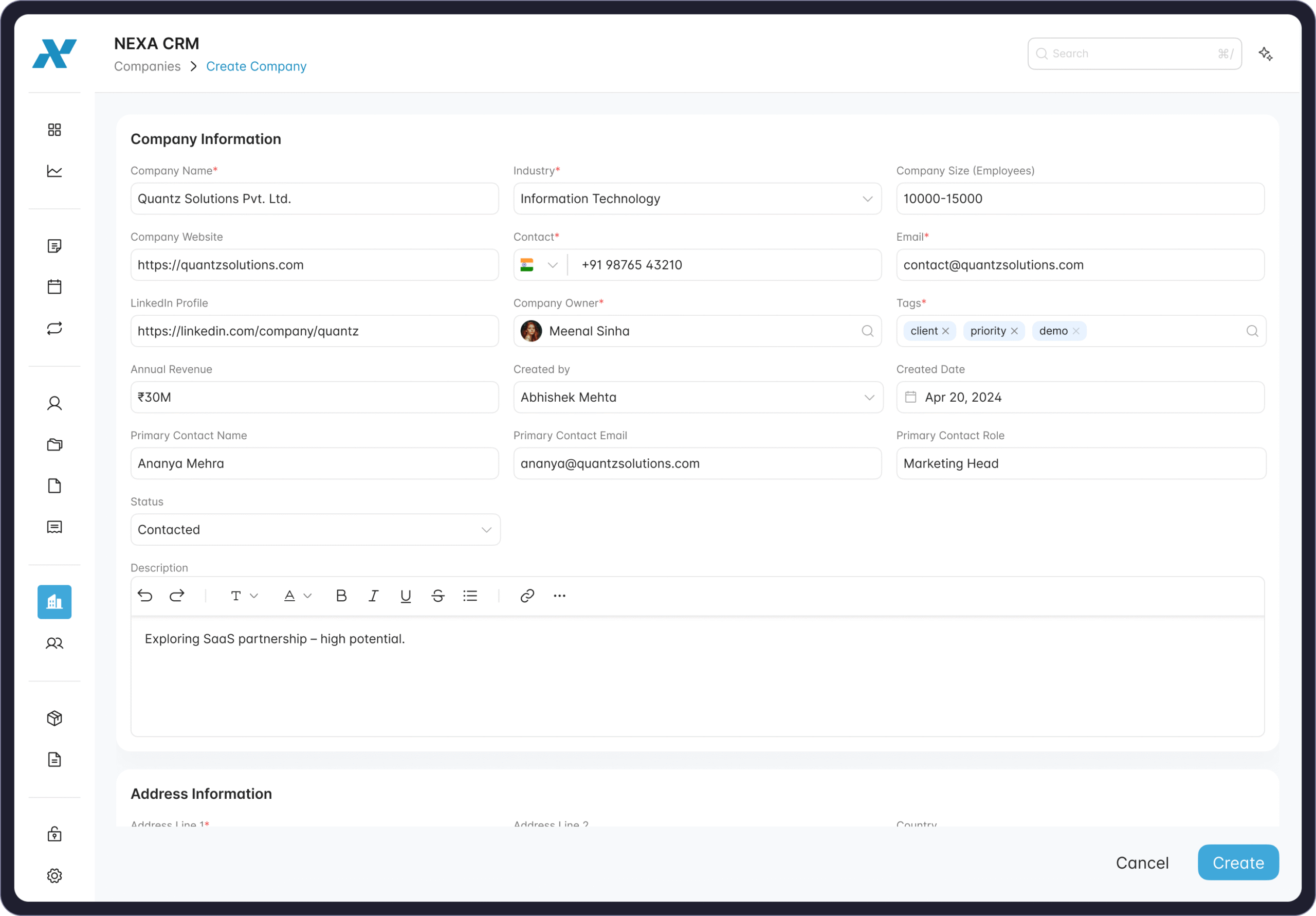
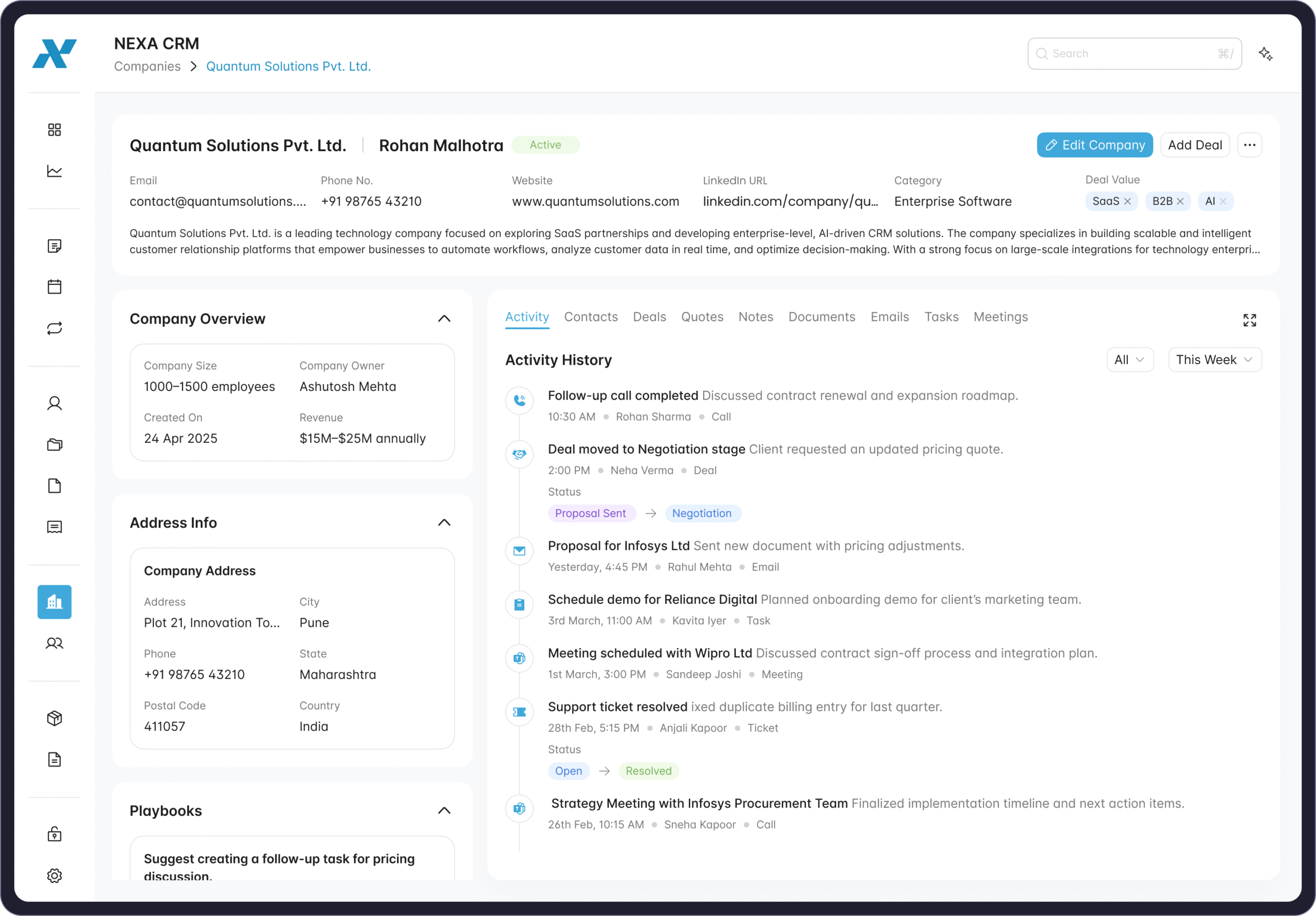
(16). Companies
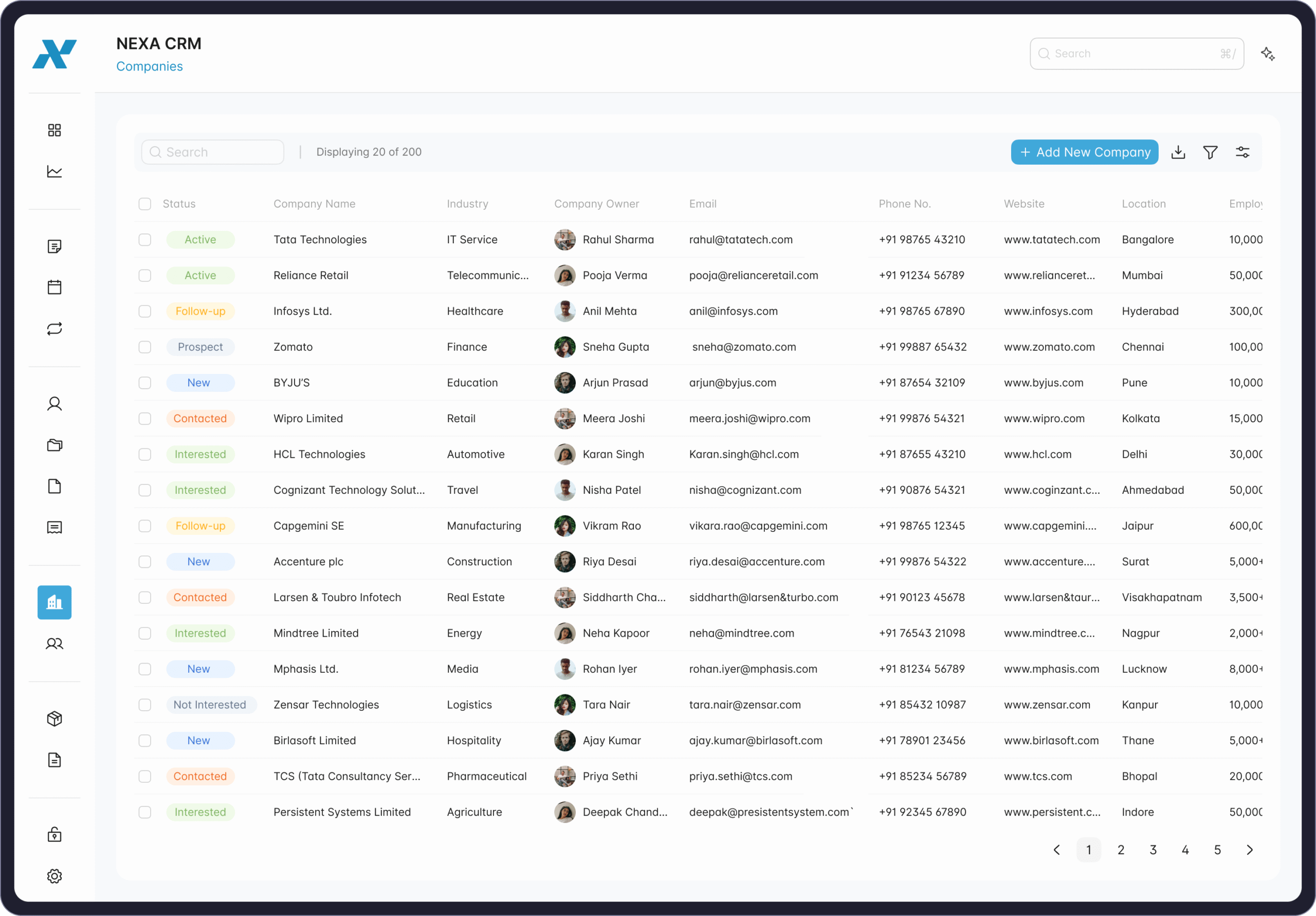
The Companies module gives a complete view of every organization you work with — including company info, key contacts, deals, and activities. View essential details like size, revenue, industry, and ownership, along with contact data, address, and website links.
Track every interaction through a unified activity timeline covering calls, meetings, tasks, and emails. Linked contacts, deals, and playbooks help teams manage relationships, ensure accountability, and maintain consistency. With support for notes, documents, and external integrations like LinkedIn or email, the Companies view centralizes all business data — helping teams make informed, data-driven decisions and build stronger client partnerships.
(17). Contacts
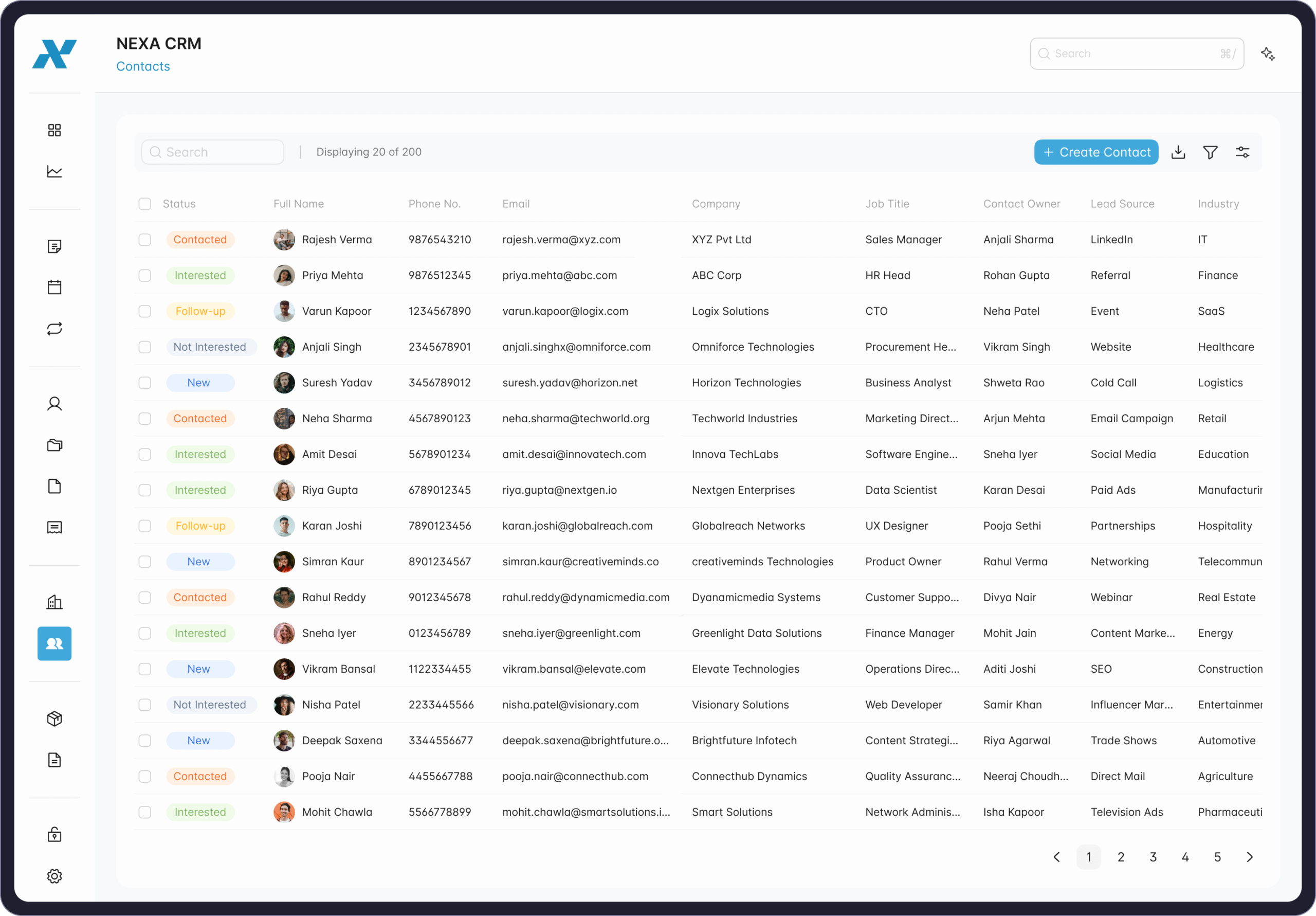
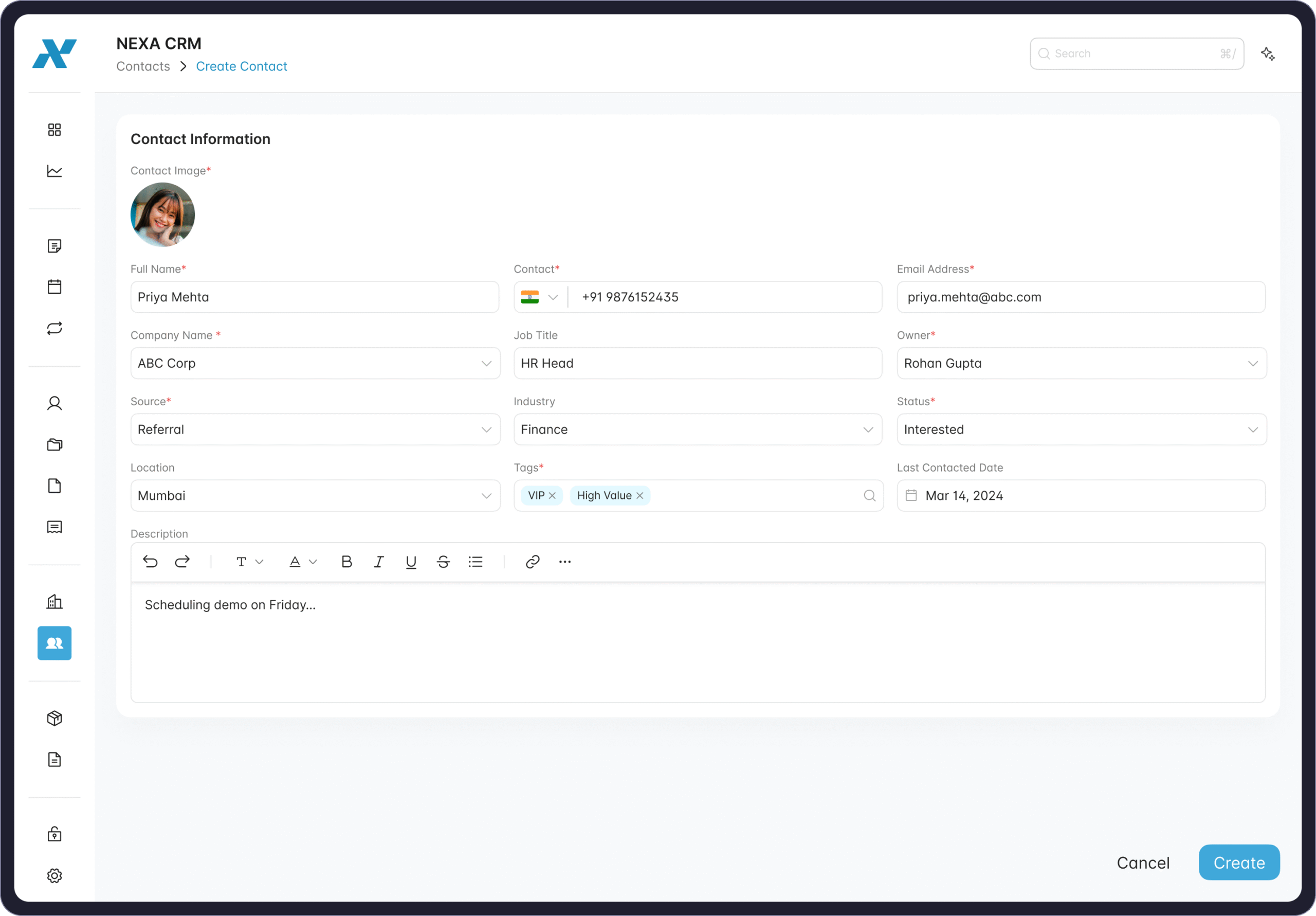
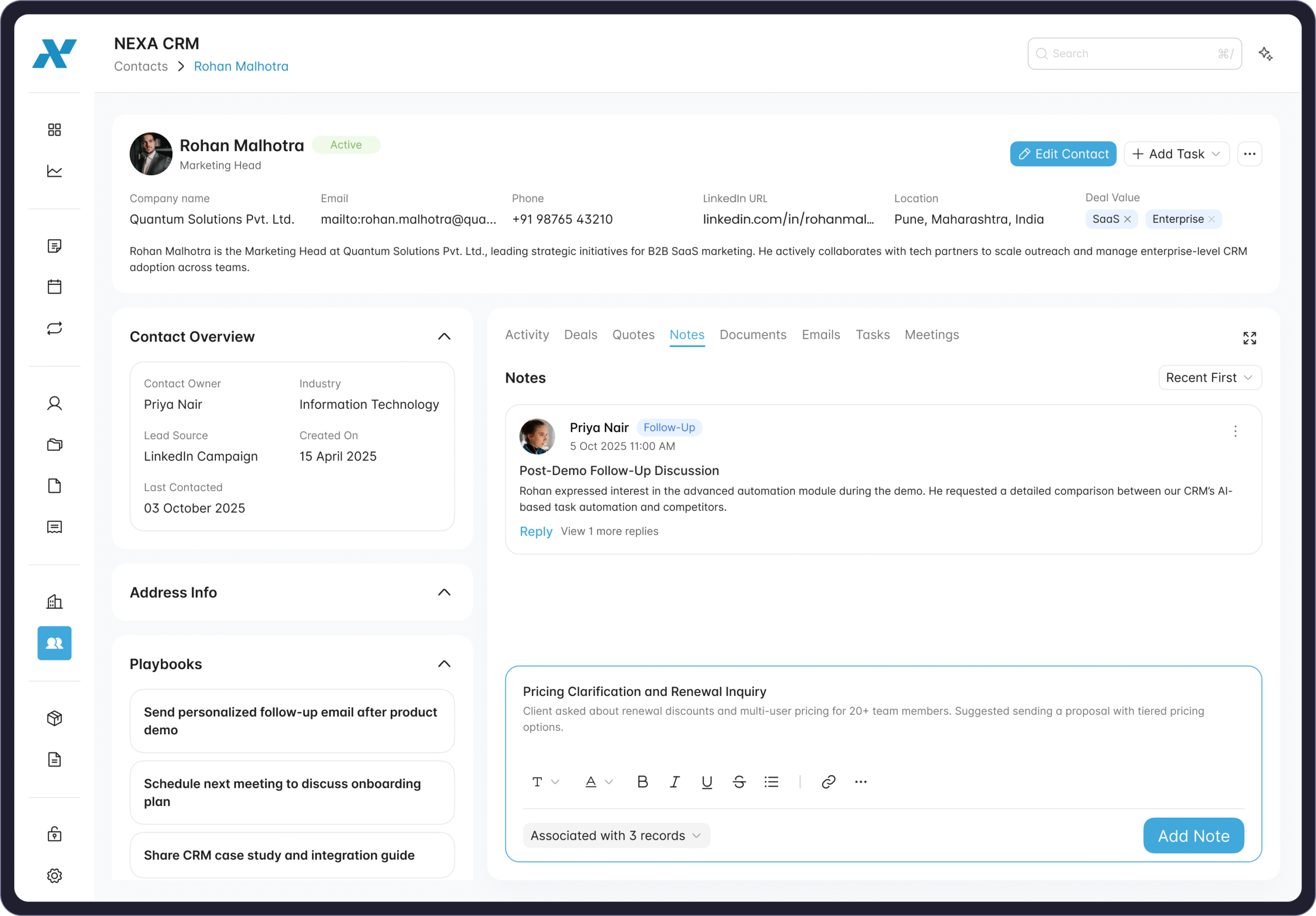
The Contacts module keeps all your customer and prospect information in one connected view – helping teams manage relationships with clarity and context. Each contact profile includes details like name, phone, email, job title, company, location, and lead source, along with tags and ownership to ensure every interaction is personalized and traceable.
The contact view brings together playbooks, activity timelines, and notes to simplify daily workflows. Teams can log calls, emails, meetings, and tasks, track follow-ups, and record important notes — such as discussion points, next steps, and follow-up dates — all in one place.
Smart linking with companies and deals ensures you always have a 360° understanding of who you’re engaging with and how the relationship is progressing. Whether you’re nurturing leads or supporting existing clients, the Contacts view makes it easier to stay organized, proactive, and connected.
(18). Products & Licensing - Streamline Your Offerings and Subscriptions
Manage your products, pricing, and digital licenses – all in one place.
With NEXA CRM’s Products & Licensing module, you get a complete overview of your entire catalog – from physical products to SaaS subscriptions.
In the Product List, view and manage real-time data including status, category, pricing, cost, margin, billing frequency, and internal notes. Create or edit products easily with flexible form fields that ensure accuracy and consistency.
The Licensing Dashboard gives you full control over digital access and renewals. Track license ID, assigned customers, modules, plans, license type, user limits, usage, and start and end dates all at a glance.
Automate renewals, assign ownership, and ensure every active license stays compliant and up to date.
Together, Products & Licensing empower your sales, billing, and support teams to work seamlessly – with full transparency, traceability, and control across your entire product lifecycle.